Keep AI on your hardware.
Connect a local model to process the prompts and files you give it on hardware you control. Choose this path when you want your model processing to stay local.
Connect with LM Studio, vLLM or a compatible model server.
A simple desktop assistant for everyday work. Connect a model on your own hardware or choose a cloud provider. Make Nawa work your way.
Your model. Your workspace. Your choice.

Why I built Nawa
“I wanted an assistant that lets people choose their own AI and keep their work private when they choose to. Something simple enough for everyday use, with a welcoming interface and the freedom to run a model locally or connect to the cloud. That’s why I built Nawa.”
Mohamed QasemCreator of Nawa
You choose where AI runs
Choose the model that fits your work and your privacy needs, while keeping the same familiar interface.
Connect a local model to process the prompts and files you give it on hardware you control. Choose this path when you want your model processing to stay local.
Connect with LM Studio, vLLM or a compatible model server.
Connect your preferred provider and choose a model for the task. Content you send to it is handled under that provider’s policies and your account settings.
OpenAI · Anthropic · Gemini · OpenRouter · and more
See it work
Research a subject, create a document or build an idea. These are recorded examples from Nawa’s public beta.
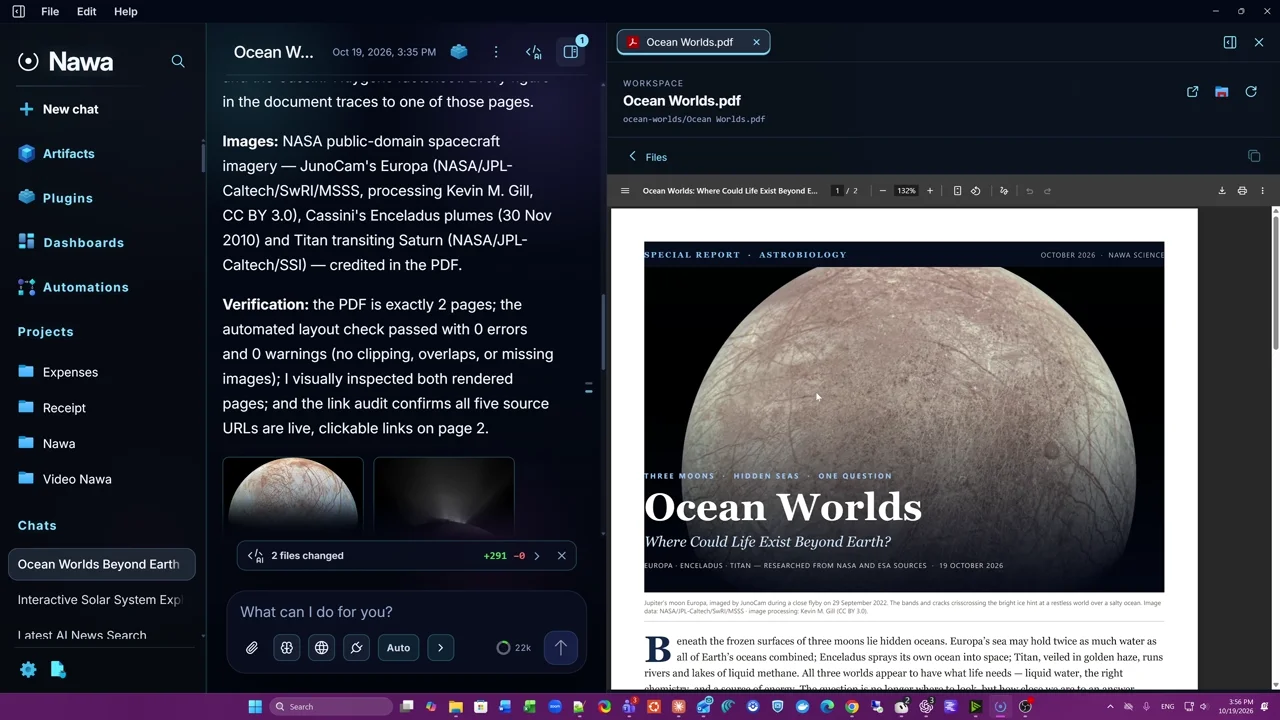
A science report with illustrations and sources.
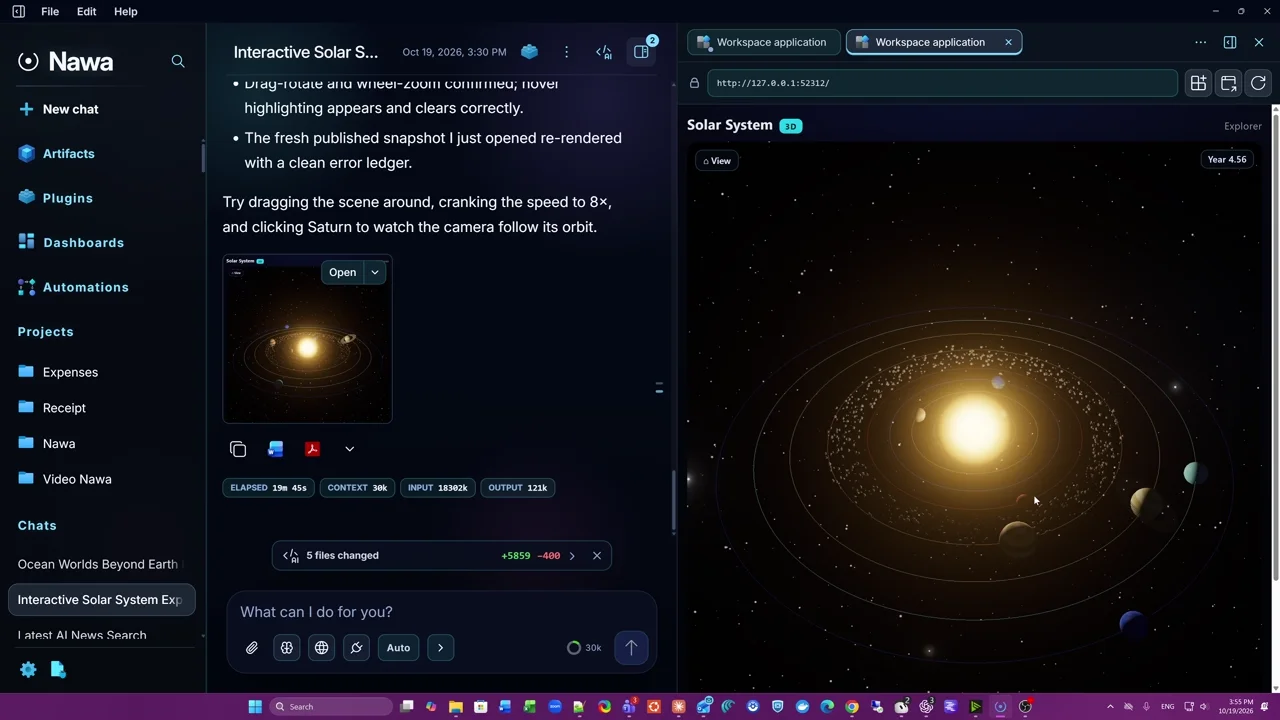
An interactive solar system, built through conversation.
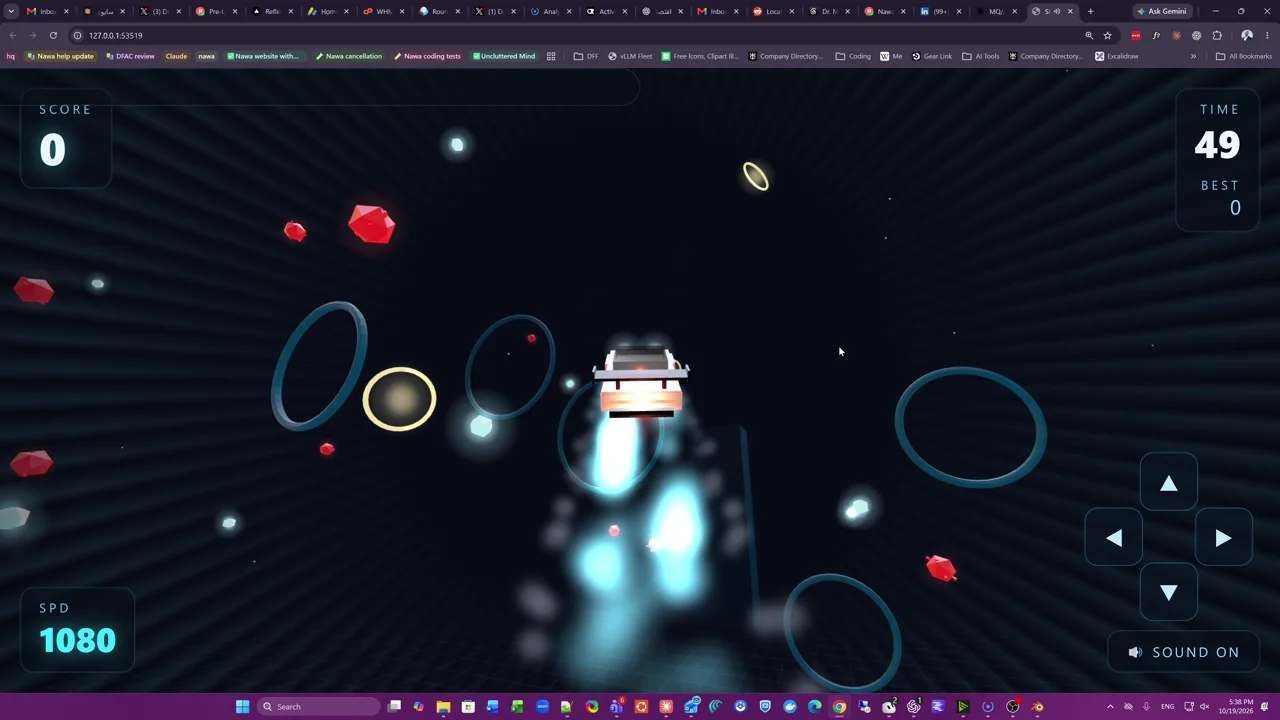
A flying-car game you can actually play.
Videos open on YouTube when you choose to watch.
What it does
You chat with Nawa, and it can research on the web, build and run applications in a workspace of its own, drive a browser, control the desktop through plugins, and review code changes, while you decide what it may do without asking.
Search in the background with Web search (DDGS), without a key or an open browser, or connect a search API. Numbered citations open pages Nawa actually read.
The coder writes the app in a workspace of its own, runs its tests and clicks through it in a real browser before calling it ready. Open it in the drawer and keep it in Artifacts.
A built-in headless Chromium for its own work, and Chrome control, which opens a Chrome window with a persistent profile so you sign in to sites once.
The Desktop Control plugin lists windows and their controls, acts on Windows applications, and checks the result.
A project links chats to a real folder. Coding changes are saved as Git checkpoints, so you can ask to undo a particular change.
The files a chat changed are listed in one place, and their diffs open in the drawer beside the conversation.
Schedule recurring tasks, each approved by you and checked before it runs, and gather saved artifacts into dashboards.
Gmail, Google Calendar, Drive, Slack, GitHub, Notion and more, or any MCP server, local or remote, with a permission for each tool.
Learned memories save with an Undo control. Review or remove them in Settings, keep chat notes in the workspace, and see context compaction in the transcript.
@imageHow it works
Every turn runs the same agentic loop, with real files, Git as the safety net, and the transcript as memory.
Nawa resolves the models, reads the AGENTS.md files that apply, and builds the tool list.
It builds the exact request, counts its tokens, and compacts older history if it would not fit.
Text and tool calls stream into the transcript as they arrive.
Every tool call is checked against the chat's permission mode; one that needs you pauses on a card.
Tools run in the sandbox and report exit codes, output and page elements back, until the model answers.
A turn ends on a verified answer, a real blocker or your Stop, never on a timer. Its transcript, commits and memory are kept.
Nawa owns the guarantees
Truthful observations and errors, stable identity, persistence, permissions, transactions, tool execution, validation, process lifecycle, and state consistency.
The model owns the decisions
Interpreting intent, planning, selecting tools, researching, coding, diagnosing, and adapting.
Instructions, agents and skills
Beyond what you type into a chat, three things shape how Nawa works: instruction files you write, the agents it delegates to, and the skills those agents pick up.
Instructions, agents and skillsAGENTS.md holds standing instructions in plain Markdown. Where a file lives decides what it governs, and the deepest one that applies wins.
%APPDATA%\Nawa\config\AGENTS.mdEvery chat and project on this profile
my-app\AGENTS.mdThat project and the agents it delegates to
my-app\reports\AGENTS.mdThat folder and everything under it
What you say in the chatOutranks any file
Changes apply from the next request. Nothing in an instruction file grants a permission.
For work that deserves a context of its own, Nawa delegates to an agent: a role with its own instructions, tools, model and effort. Five are built in.
Describe a role in a chat to create your own. Customising a built-in agent keeps the original, ready to restore.
A skill is a packaged procedure with its own steps, scripts and references. An agent picks one up when a task matches it, or when you name it.
Ask for one of your own, such as your monthly report. Plugins can bring skills too.
Safety
Pick a permission mode for each chat. When Nawa needs more, a card names the tool and the exact command, and waits for Allow once, Always allow or Deny. It never times out.
nawa-exec.exe under a low-integrity restricted token, on a private desktop.%APPDATA%\Nawa, with keys encrypted.Manual
Asks before every gated action.
Accept edits
Works freely inside the chat's workspace; asks before shell commands.
Plan
Reads, computes and researches; gated actions are denied.
Auto Default
Runs ordinary work; asks before risky actions such as destructive commands.
Bypass permissions
Runs gated actions; durable automation changes still ask.
Prompts, files and observations supplied to a cloud model or connected service are transmitted to that provider; local storage does not mean all processing stays on this computer.
Windows
The website installer includes Nawa’s engine, runtimes and sandbox. Connect your model provider to start; no Nawa account is required.
For the current user, with a Start-menu shortcut. You connect a model provider; no Nawa account is needed.
The website edition checks every six hours and downloads updates in the background. Both editions preserve your profile; Store-edition updates use a newer Store installer.
Node.js, Git, ripgrep, a headless Chromium and the sandbox runner come with it.
Right-click files and choose Ask Nawa to open a compact prompt about them.
The taskbar icon shows how many finished chats you have not seen yet.
Help → Nawa Help opens the latest online handbook, with setup guides, troubleshooting and a versioned changelog.
Latest release · 1.0.109
OpenRouter checks your key before you start. Model context sizes appear beside each model, screenshots reach Main and the coder, and a dedicated Privacy tab puts your choices together.
Connect validates OpenRouter keys and asks you to choose a model. Each model shows its context size and compaction percentage; a reported context-limit refusal can recover without losing the task.
Screenshot delivery, Anthropic history, sandboxed builds and preview startup are more reliable. Workspace scans and token counting reuse observations, and quiet responses keep working while the model prepares its answer.
Both editions are built and tested together. The website edition offers optional Tailscale access. The Store edition stays local, with remote access disabled and a separate update path.
See all changes and refreshed screenshots · Compare the editions · Full changelog
Nawa is now available on the Microsoft Store. You can also download the website edition directly.
Make it yours
Nawa opens in Nawa Dark. Pick another under Settings → General → Theme template, and the whole app takes on its colours, surfaces and corners at once.
Appearance settings
Public beta
Nawa for Windows 10 and 11. Download the public beta and start making things.
The Store edition keeps remote access disabled. For optional Tailscale remote access, choose the direct download. Compare editions.
Connect your own provider API key or local model. Model access is not included; your provider may charge for usage.
This is a beta. Expect rough edges, keep backups of important work, and tell us what needs improving.
Run the Windows installer. It downloads the tools Nawa needs.
Installation guideAdd a provider API key or connect a local model in Settings.
Connect a providerAsk a question or build something small, then share your feedback.
Your first chatGet emails about new features and releases. Stay in touch with Nawa.
You're subscribed to release updates. You can download Nawa now.