Reference
On this page
Image Generation
Image creation and editing use a separate provider from your language model. Open a card to configure it; choose its circle to make it the active image connection. Opening or testing a card does not change the active connection. The switch enables the image tool for new turns; turning it off keeps the saved connections.
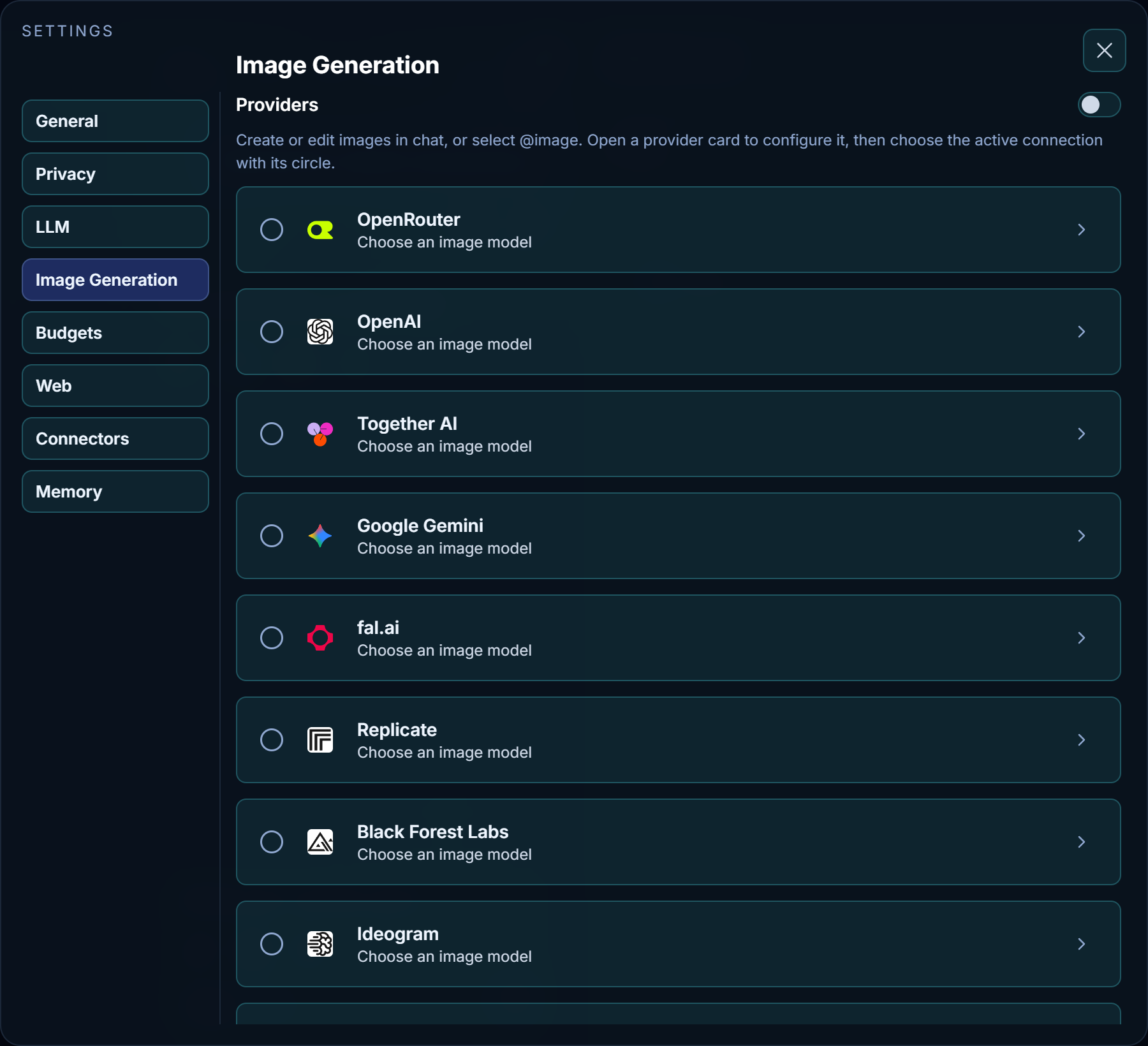
Existing vLLM Fleet connections retain their URL, key, model, generation defaults, and active selection. Use Add connection for another account or server. Each connection keeps its own encrypted API key.
Providers and models
| Card | Generation and editing |
|---|---|
| OpenRouter | Uses the Images API and its image-model catalogue. Editing sends image references to the same API. Choose a model that supports the requested operation. |
| OpenAI | Uses the Images API for generation and multipart image edits. Choose a GPT Image model; options vary by model. |
| Together AI | Uses its image API, including reference images for supported editing models. |
| Google Gemini | Uses native image generation with text and image parts. Choose an image-capable Gemini model. One image is requested per tool call. |
| fal.ai | Uses its synchronous image endpoints and public model catalogue. Enter the generation model and a separate Editing model, such as the corresponding FLUX.2 edit endpoint. Models must support the standard prompt and image-reference fields; specialized endpoints may need different inputs. |
| Replicate | Uses predictions and waits for queued results. Enter owner/model or owner/model:version. The adapter reads that model's input schema before sending options and reference images. The catalogue includes non-image models too; choose an image model. Models with ambiguous or different reference fields return an explicit unsupported-input error. |
| Black Forest Labs | Uses the native FLUX API, including queued results and region-specific polling. FLUX.2 supports multiple reference images. Other models can have different editing support. One image per call. |
| Ideogram | Uses the v2 generation API with multipart reference images for edits. The suggested Ideogram 4.5 model supports generation, reference editing and transparent backgrounds. Connection checks use the unbilled dry-run API. |
| Stability AI | Uses Stable Image Core, Ultra, or SD3.5. SD3.5 and Ultra accept one reference image; Core is generation only. Edit strength controls transformation; a saved aspect ratio applies only to new images. One image per call. |
| Recraft | Uses native generation and image-to-image APIs. Choose a vector model such as recraftv3_vector for SVG output, which Nawa saves and displays as a vector. Editing accepts one reference; SVG references are rendered to pixels by Nawa's shared image reader. |
| Custom / vLLM Fleet | Preserves the OpenAI-compatible generation and multipart-edit protocol, including Qwen-Image servers. |
Connect, beside the API key, loads model suggestions without generating an image. Its connection status appears immediately below. For Black Forest Labs, Stability AI and Recraft it checks account access; for Ideogram it validates an unbilled dry-run request. These cards show suggestions from provider documentation rather than claiming to have discovered an account-specific model list. The themed model dropdown includes Enter a custom model ID…. OpenRouter and fal.ai publish public catalogues: a loaded catalogue does not prove that your key has inference access. Load more models continues a paginated catalogue.
Model lists retain their discovered entries when settings reopen or the page reloads within the same app session. Changing the URL or key invalidates the old catalogue. Connect refreshes the list; duplicate entries are removed. Models are ordered by release date where supplied by the provider or recorded from published release announcements. When dates are unavailable, descending version numbers and model IDs provide a stable fallback, rather than claiming an exact release chronology. The dropdown shows all choices, without filtering them by the currently selected model.
Generate test image sends a small sample prompt to that connection and displays the result. It uses the same generation path as chat and may incur the provider's normal charge. Cancel test stops waiting for the request; a provider may still finish or charge for work it already accepted. A rejection displays the provider's error. Tests do not enable image generation or select another active connection.
Defaults and use in chat
Ask for the desired size, aspect ratio and resolution in your prompt; these are no longer settings controls. Existing saved defaults are retained for compatibility, and explicit requests override them. Provider-supported quality, inference steps, edit strength, background and output format remain available. Individual models may support a subset. Blank options use the model's defaults, except the required image-to-image strength defaults to 0.7. The request timeout defaults to 300 seconds and includes model lookup and queued-result polling.
Ask for an image normally or use @image. For an edit, attach an image or refer to an earlier generated one and describe the change. Nawa sends the referenced pixels, saves the result as a new file, and preserves the originals. The result appears in the answer; click the preview to enlarge it. A saved generation size does not override an edit's reference dimensions unless a size is explicitly requested.
See Connect a provider for a walkthrough.