Reference
On this page
LLM
This tab chooses the language model Nawa talks to, an optional decision model, and when long conversations are compacted. For a step-by-step walk-through of connecting each kind of provider, see Connect a provider.
LLM setups
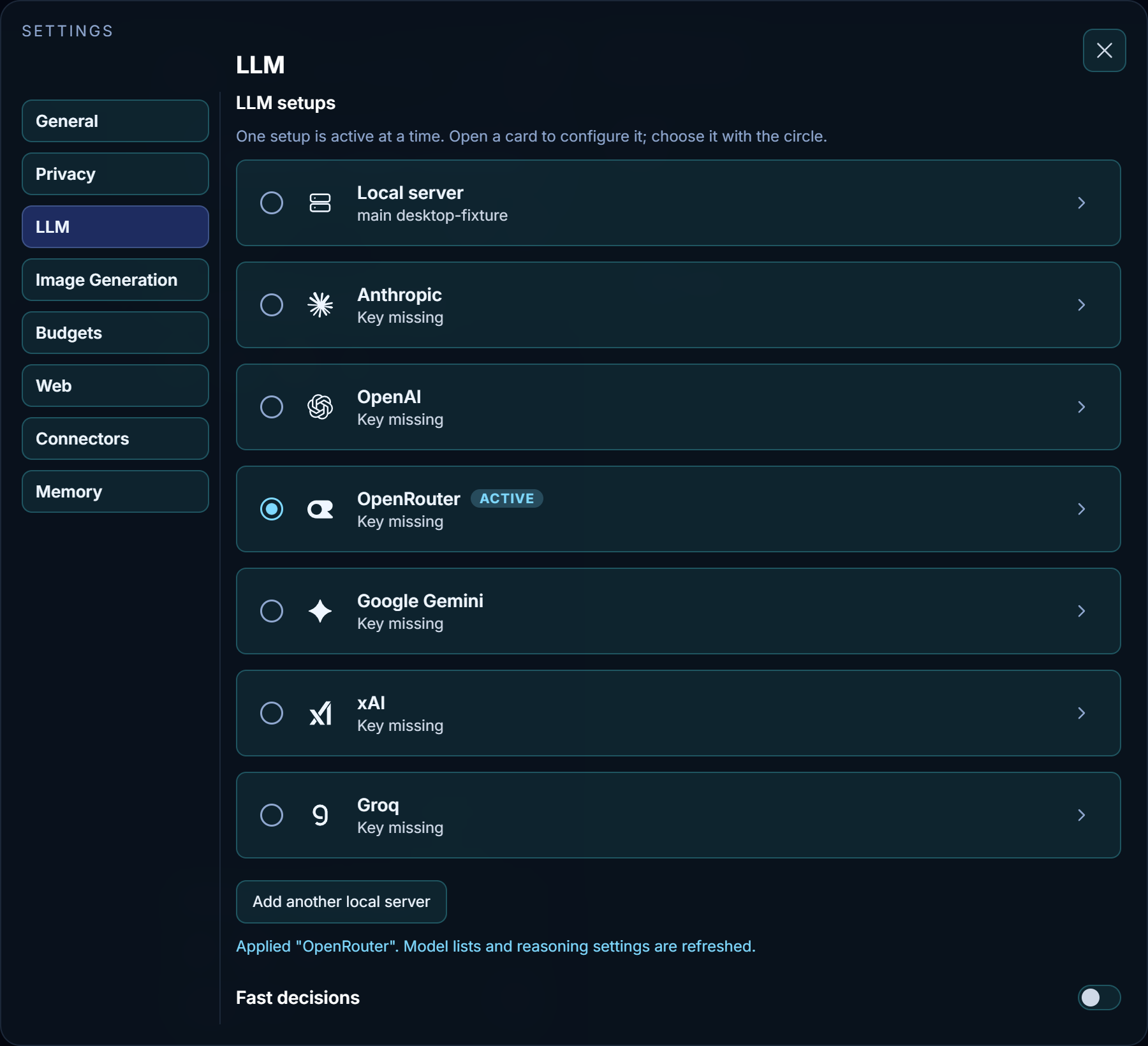
Each card is one setup: a provider, or a server of your own. Exactly one setup is the default, marked Active; new chats start from it. Once a chat saves its model selection, Main and Coder keep that chat’s setup even if you change the default in Settings. Click a card's name to open or close its form. You can inspect, edit and test another setup without changing the active connection. Only the circle at a card's left makes it active. New local servers also open for configuration without becoming active. The line under each name is its status: Key missing until a key is saved, then the model or models it uses.
- Cloud cards — Anthropic, OpenAI, OpenRouter, Google Gemini, xAI and Groq
- Each uses Main for the primary connection, with Coder below it. Main holds an API key with Connect beside it. The next row holds Model and Temperature, then Compact at (%) with the model's context size beneath it, followed by reasoning controls. That one model serves every role. The model dropdown stays empty until a connection test succeeds. Changing the key clears the list immediately; a failed test leaves it empty.
- Local server
- A server you run yourself or reach on your network, such as vLLM or LM Studio. It has a name and two roles, described below.
- Add another local server
- Adds a second local-server card, for a second machine or a different server. Selecting a card changes the default Main and Coder setup for new chats; it does not reroute existing chats with saved selections.
The note under the list reports the last change, for example that a setup was applied and its model lists refreshed.
Model and reasoning choices belong to the chat
The reasoning menu beside the chat input shows that chat's Main chat and Coder choices. Select a saved setup there to change the chat, or change its supported reasoning level. Changes apply to later turns; a running turn keeps the connection and settings captured at its start. Credentials remain in account settings, so rotating a matching provider key does not copy secrets into chat metadata.
Model lists exclude known realtime and image-only models from chat choices. Reasoning levels come from the selected model's reported capabilities. A successful check reconciles an old unsupported choice; a failed capability check preserves your selected level and reports the failure instead of silently turning reasoning off or replacing Thinking with Working. Default leaves the effort to the provider. Model reasoning and public progress narration are separate: verbosity controls narration, not reasoning.
The roles of a local server
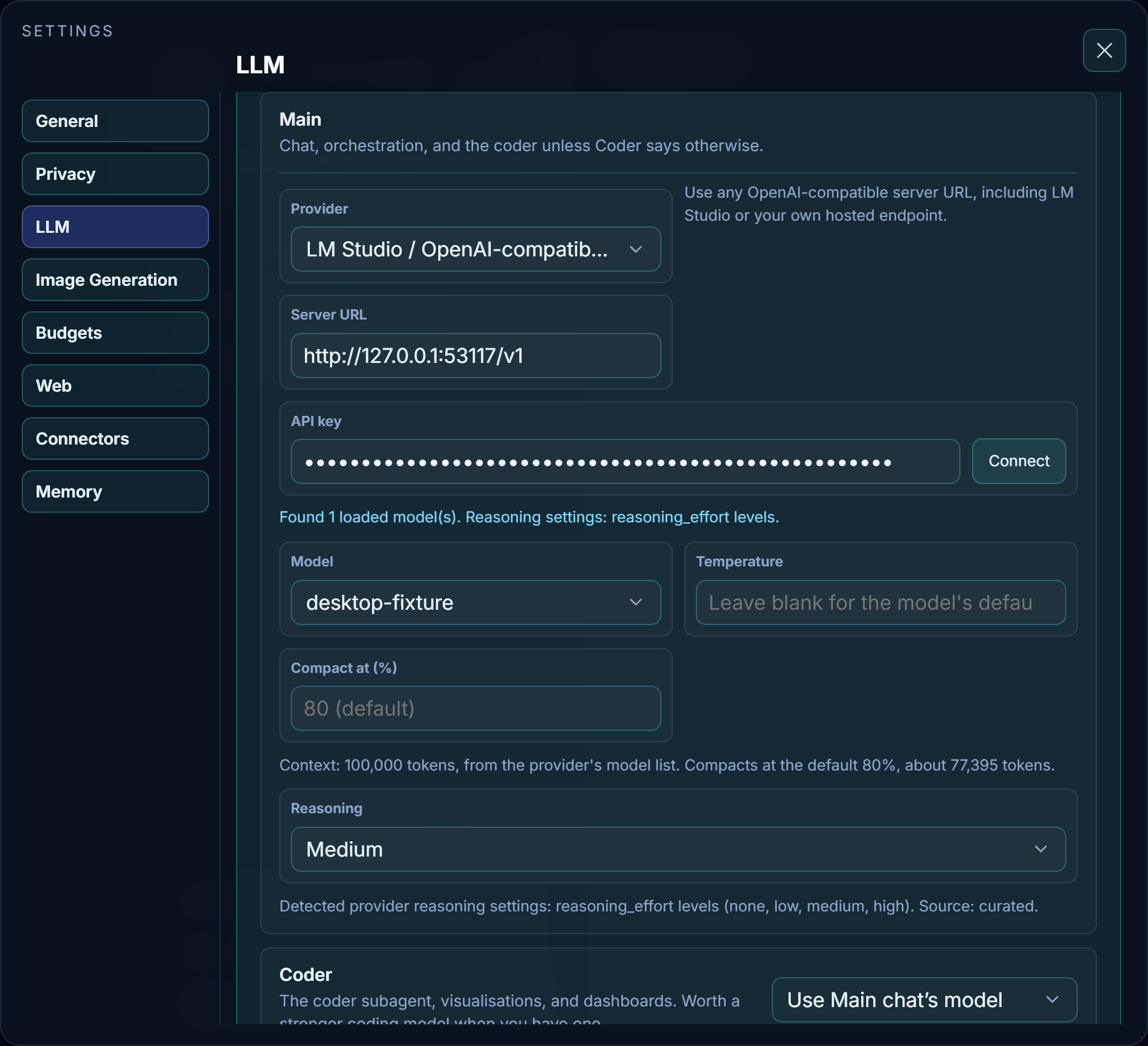
- Name
- Tells your servers apart in the list. It is saved when you leave the field or press Enter.
- Main
-
Answers chats and orchestrates tools, and serves the coder unless Coder says otherwise. Its fields:
- Provider — vLLM server, LM Studio / OpenAI-compatible server, or OpenAI API for the hosted API. The note beside it describes the choice.
- Server URL — the server's address, for example
http://127.0.0.1:1234/v1. - API key — only if your local server requires one. Hosted providers require their key.
- Connect — beside the API key. It saves the current connection, loads its model list and detects which reasoning controls the model supports. A provider that shares its model list without a key, such as OpenRouter, is also asked to confirm the key, so a key it refuses shows here. The status below says what was found, or, in red, why the check did not complete. With no model saved yet, Model reads Choose a model; Nawa does not pick one for you.
- Model — below the key and test button. The dropdown stays empty until the connection is successfully tested. Changing the URL or key clears the displayed list without deleting your saved model choice. A local server without a key can return models after a successful test.
- Temperature — beside Model, from 0 to 2; blank uses the model's own default. Lower is steadier, higher more varied.
- Reasoning — once the test has detected support, either an on/off switch or a list of levels, depending on what the model accepts. The reasoning button beside the chat input opens Main chat and Coder tabs, each showing its current choice. Switching tabs slides the selection box and shows that role’s detected modes. Coder can Inherit from Main chat or use Custom reasoning. Choosing a Coder level switches reasoning to Custom; its model connection stays linked. Changing Main also changes Coder while inheritance is enabled. Hover over the reasoning button to see both choices. Default leaves the effort to the provider; its declared default is shown when available. Off appears only when the model supports disabling reasoning. Models without reasoning have nothing to set. Changes apply to new turns; a running turn keeps the settings it started with.
- Coder
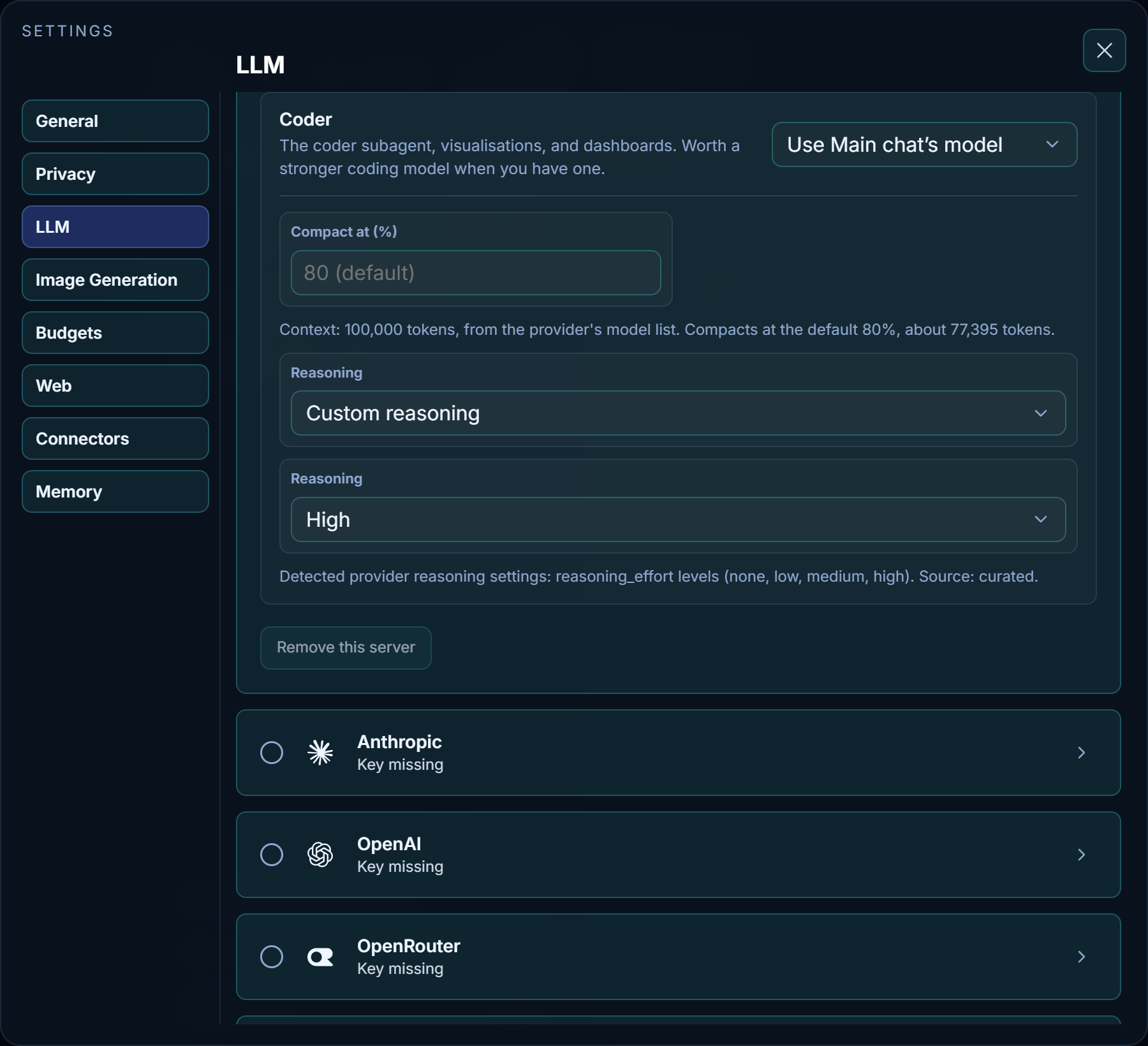
- The coder that builds and checks apps, visualisations and dashboards. A stronger coding model helps here when you have one.
Coder has one list at the right of its heading:
- Use Main chat’s model — use the Main model. This links the connection; Coder’s reasoning and compaction percentage are set separately.
- A model name — another model from the same server.
- Another server… — a server of its own, with the same Provider, Server URL, API key, Connect, Model and Temperature sequence as Main. Enter that server's URL and its own key if required. Use Use Main chat’s model to share Main's connection.
Chat titles, context notes, and the screening of web and tool content before the main model reads it are written by the Main model itself, with its reasoning turned off (or at its lowest level, for a model that cannot turn reasoning off). They have no settings of their own.
Coder’s reasoning controls stay visible even when its model is linked. Inherit from Main chat follows Main’s toggle, control and level; Custom reasoning uses the coder’s own choices. Existing saved coder choices are preserved as Custom. New setups inherit by default. Cloud setups share one model connection and also expose the Coder reasoning choice.
- Compact at (%)
- Beside each role's model, Main and Coder alike, and always visible. Each accepts 50 to 95; blank uses the default, initially 80%. For example, set Main to 80% and Coder to 50%, whether they use the same model or different models. Each role remembers its percentage for each server URL and model name, so switching models restores that role's saved percentage. Editing or clearing one role leaves the other unchanged. Previously shared percentages become separate saved values for both roles. The note beneath shows the model's context size and where it came from (the provider's model record, its model list, Nawa's model table, or the limit the provider stated when it refused a longer request), then the effective percentage and the approximate token count where compaction starts, after safety and response headroom. Nobody sets the context size: a server that reports none is shown as assumed to have 256,000 tokens until it states its limit. Changes apply to new turns; a running turn keeps its original settings.
- Companies
- Under the model, for a provider such as OpenRouter that serves one model from many companies. Open it to see each company that serves the model, with OpenRouter's recent figures: how often it was up, how fast it writes, how long it takes to start, and whether it keeps prompts it has already read. Set a company to Prefer or Avoid. Preferred companies are tried first, in the order you picked them; avoided ones are never used; with none chosen, OpenRouter picks. The choice belongs to the model, so Main and Coder share it, and it applies to every request for that model from the next turn. When requests keep moving between companies, long work gets slower, because each new company has to read the whole conversation again.
- Remove this server
- Removes the local-server card you are on, as long as one local card remains.
Fast decisions
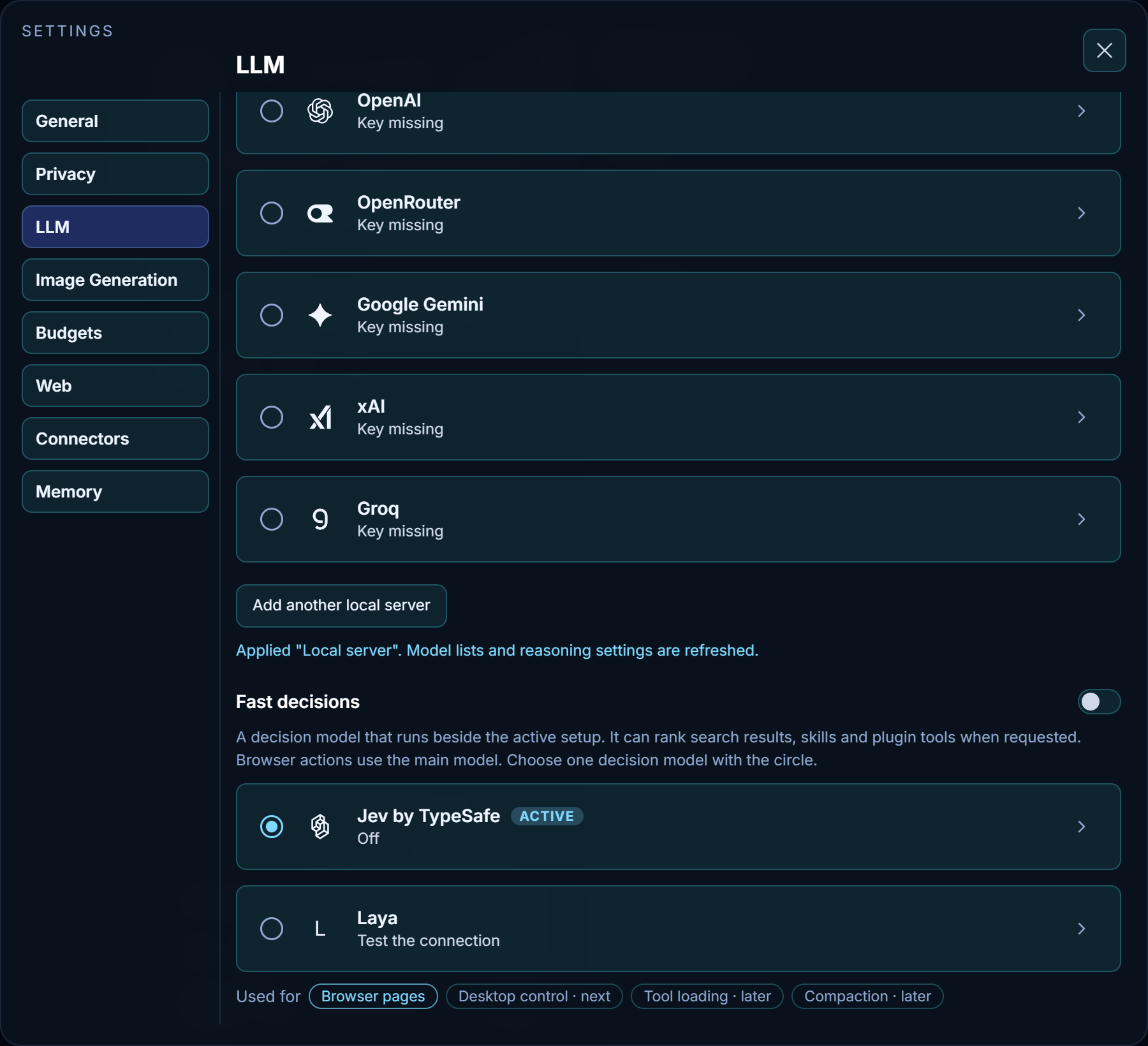
Image creation and editing have their own Image Generation tab.
- Fast decisions
-
An optional decision model beside the active setup. Main and Coder can ask general typed questions, generated apps can use it through Nawa, and discovery tools can rank search results, skills and plugin tools. The main model still chooses what to use. Browser actions always use the main model. Two cards are offered, chosen with their circles:
- Jev by TypeSafe — Source is TypeSafe with a key of its own, or Through OpenRouter with the key on the OpenRouter card. Base URL (Endpoint through OpenRouter) shows the provider's default address as a hint; leave it blank unless you use a different address.
- Laya — a Server on your own machine or fleet (
http://127.0.0.1:8080by default), with an API key only if that server asks for one. Page text goes to that server. Start the model on your Laya server, then press Connect; after a server reboot, check that the model is running again.
A card's name opens it; only its circle selects it for use. Inside is its own Connect, and the card's status shows the result. Nothing is consulted until the switch in the section heading is on. The Used for row still highlights Browser pages, but browser pages no longer use the decision model; the note above the cards is current. See Decisions beside the LLM.
Compaction is configured only with Compact at (%) beside each model. Blank uses the default shown in the field: 80% for new accounts, or an existing customized default. Lower percentages compact sooner. See Context and compaction.